Showing posts with label tool. Show all posts

Sunday, 10 June 2012

filestube


Google has published detailed information on the wide variety of DMCA takedown requests the company receives for its search engine. During the last month alone Google was asked to remove 1,246,713 links across 24,129 domains, including many torrent sites and cyberlockers. Interestingly enough, Google receives the most takedowns for FilesTube, a colleague search-engine which by itself honors DMCA takedown requests and already removes even more links than Google does.
filestube
Under the DMCA copyright holders have the right to demand that websites disable access to infringing content. One of the top recipients of these notices is without a doubt Google.

To give the public insight into the scope and nature of this process Google has decided to publish all takedown requests online as part of their transparency report.
“Specifically, we’re disclosing the number of requests we get from copyright owners and the organizations that represent them to remove Google Search results because they allegedly link to infringing content,” Google states.

Download Notepad++ 6.1.3


Release Date: 2012-05-28

Notepad++ v6.1.3 enhancement and fixed bugs:

  1. Enhance the performance issue for xml matching tags highlighting and for displaying clickable links.
  2. While the amount of file to open is larger than 200, a dialog will be shown to warn user.
  3. Fix Notepad++ close bug while move one cloned new empty document into another view, in the destination contained only this new empty document.
  4. Fix hanging problem while double-click on a project folder then (immediately) drag it.
  5. Fix a bug while command argument contain an empty string ("").
  6. Fix mouse cursor disappearing bug on right click while a project item is dragging.

Included plugins (Unicode)

Friday, 8 June 2012

Everest Home Edition 2.20

Everest Home Edition is a system information tool that can provide information on basically every single piece of hardware hidden underneath your PC case, be it the motherboard, the display adapter or a multimedia device.

Although you may find it a bit difficult at the first sight, the main window is full of relevant information regarding your computer, but if you still have problems when trying to read the data, there's also the help manual that comprises tons of details.

The application inspects the computer and uses a clean and organized interface to provide information regarding the whole machine, the motherboard, the display adapter, the multimedia and storage devices, the network and the other pieces of hardware your computer may have.

In addition, there are also three benchmarks that enable you to test memory read, write and latency, all of which are completed in just a few seconds.

During our testing, Everest worked like a charm, as it's fast, easy to use and provides the collected information in a simple and clean way. What we liked the most is the amount of info it shows to the user, including details regarding the motherboard and the CPU, the video adapter, storage devices, the operating system and the installed software.

If there's something wrong in your system and Everest detects it, the application displays some recommendations to fix all the problems. Plus, it can also create a detailed report with information regarding your computer in which it presents the current status of all hardware components.

Last but not least, Everest Home Edition can generate reports of the system summary, the hardware-related information or using the benchmark pages, either as a HTML file as as plain text.

All things considered, Everest Home Edition is one of the most useful system information tools on the market. Combining a handy interface with advanced features, it should be one of the top picks for most computer users out there.


DownLoad:

TeamViewer


Full version
Quick version


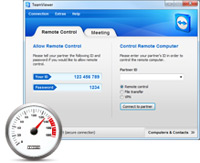
TeamViewer is an excellent screen-sharing and file-transfer app that can be used to facilitate business collaborations, remotely access a second computer, or help distraught relatives diagnose and cure computer problems. Along with being free for noncorporate use, it gives users precisely the tools they need to share screens securely, send files with a minimum of hassle, control access rights, and even flip which user has control.
The options available while you're in control work smoothly. You can maximize the pane that the other computer's screen is visible in, as well as utilize several smart options from a drop-down toolbar in the center of the window. A big X lets you close the connection, while the Actions button lets you switch who's in control, disable remote input, and reboot remotely. The View menu hides options to adjust the screen resolution, the optimization toward speed or quality, and control multiple-monitor displays. New features that work just as effortlessly as the old ones include VoIP audio and video conferencing, and integrated teleconferencing. These features push TeamViewer a notch above the rest because they will work without requiring firewall reconfiguration.
When you log in, you're given an access code and a password. Sharing those allows your computer to be controlled by the level you set it to: remote support, presentation, file transfer, or VPN. The TeamViewer servers remember which computers you've connected to, so reconnecting to previously shared computers happens faster. TeamViewer also has a Web-based version, for remote connecting to home from public computer. Even the installation process is impressive. Users can toggle admin rights, can opt out of running at startup, and can opt into installing the TeamViewer VPN driver for more secure screen sharing. TeamViewer makes screen-sharing and file-sharing as fluid and unobtrusive as it should be, and is a must-have for the home or remote office user.


Rapidgator.net

Thursday, 7 June 2012

data recovery


DiskGetor Data Recovery

DiskGetor Data Recovery là phần mềm khôi phục dữ liệu rất mạnh, có thể khôi phục lại dữ liệu đã bị xóa, dữ liệu bị mất, bị hư hỏng, dữ liệu đã bị định dạng. Chương trình cũng có thể phục hồi dữ liệu từ các định dạng đĩa cứng, ổ cứng bị hỏng, ổ cứng đã Ghost, đĩa cứng đã format, USB. Với việc sử dụng các công cụ cứu dữ liệu tốt nhất của chương trình bạn có cứu các dữ liệu bị mất (Word, Excel, PowerPoint,... các tài liệu văn phòng quan trọng sau khi các tập tin này bị xóa hoặc định dạng) từ đĩa cứng, thẻ nhớ, USB. DiskGetor Data Recovery sẽ rất có ích trong việc phục hồi dữ liệu từ định dạng phân vùng, phân vùng bị mất, repartition, thay đổi phân vùng, bảng phân vùng bị thiệt hại hoặc hư hỏng của bạn.

ProShow Producer


Những bức ảnh số không chỉ lưu lại những khoảnh khắc đáng ghi nhớ trong ổ cứng hay tải lên album ảo trên mạng mà còn có thể sử dụng để tạo thành các bộ ảnh trình chiếu tuyệt đẹp.
Công cụ mang tên Proshow Producer vượt trội ở chỗ có khả năng biến một bộ sưu tập ảnh số thành một slideshow dưới dạng file flash huyền hảo. Chương trình cho phép bạn tạo các kiệt tác trình chiếu cao cấp và mức độ chuyên nghiệp ấn tượng, tác động mạnh mẽ đến người xem.
ProShow Producer
Giao diện của Proshow Producer rất dễ sử dụng với thanh menu và thanh công cụ bố trí bên trên. Cửa sổ cây thư mục đặt bên trái có chức năng xem trước các file ảnh, bên phải là cửa sổ xem trước. Dưới cùng là nơi đưa vào các hình ảnh để tạo slideshow
Cũng là sản phẩm của hãng Photodex và cũng có chức năng tạo slideshow, nhưng Proshow Producer đã bổ sung đầy đủ, và hơn thế nữa các tính năng để người dùng dù là dân chuyên nghiệp hay những bạn học sinh đều phải công nhận đó là một phần mềm đồ họa trình diễn tốt nhất và dễ sử dụng hơn cả.
Cách sử dụng Proshow Producer hoàn toàn không khó khăn gì, chỉ qua 7 bước thực hiện trên các tính năng của chương trình:

1. Các lớp (Layers)

- Thêm không giới hạn các lớp vào bất kỳ slideshow nào.
- Cho phép kéo thả dễ dàng để bổ sung thêm nội dung vào một slideshow.
- Hỗ trợ hơn 100 loại file, có hỗ trợ các định dạng file dạng thô RAW của một số loại máy ảnh, máy quay phim kỹ thuật số.
- Hỗ trợ tính trong suốt cho các file psd, png, tiff và gif.
- Chuyển bất kỳ lớp nào thành một mặt nạ (mask) để che giấu hay làm lộ ra một phần của các lớp phía dưới.
- Thêm màu chuyển sắc (gradient) hay đồng nhất (solid) trên một lớp trình chiếu để cho ra các kết quả rất lạ mắt.
- Có nhiều hiệu ứng chuyển tiếp cho các lớp riêng biệt.
- Giúp thực hiện nhanh và dễ dàng hơn bằng cách dùng các mẫu slideshow có sẵn.
- Dễ dàng phục hồi các file thất lạc hay bị di chuyển khỏi một slideshow bằng tính năng mới Find Missing Files. Cho phép chụp ảnh các khung hình trong slide thành ảnh JPEG để in.
ProShow Producer

2. Biên tập hình ảnh (Edit)

- Có các công cụ hiệu chỉnh ảnh để làm sắc nét, hiệu chỉnh màu...
- Tạo các khung ảnh, bo viền cho hình ảnh hay các đoạn video với những họa tiết mới.
- Tạo các hiệu ứng mở màn theo phong cách điện ảnh (Hollywood-Style) bằng công cụ mới Chroma Key Transparency.
- Cho phép hiệu chỉnh độ mờ đục (opacity) cho bất kỳ lớp nào trên một slideshow.
- Tạo độ sâu cho ảnh của slideshow bằng cách điều chỉnh màu sắc và độ mờ đục của một bóng đổ lên bất kỳ lớp nào trên một slide.
- Cắt cúp và xoay ảnh hay video một cách chính xác.
- Có công cụ hỗ trợ loại bỏ hiện tượng mắt đỏ cho ảnh.

3. Chuyển động (Motions)

- Thêm nhiều chuyển động như quay theo đối tượng (pan), thu phóng (zoom) và xoay (rotate) cho bất kỳ lớp nào vào trong một slideshow, tương tự như trong điện ảnh thực.
- Zoom theo 2 trục trên màn hình X và Y đối với một lớp riêng biệt.
- Tạo các đường chuyển động phức tạp bằng cách lập các điểm chốt trên thanh trượt thời gian khung hình.
- Có thể xem trước slide có chọn lựa, cho phép bố trí chính xác các hình và các video trên một slideshow. Thực hiện điều khiển việc định giờ trình chiếu bằng thanh tiến trình (Slide Timeline) mới trong ProShow Producer 3.0. Có thể chuyển đổi qua lại giữa giao diện xem danh sách thường (Slide List) và dạng thanh tiến trình Timeline để đồng bộ chính xác phần âm thanh với cảnh nào đó trong slideshow.

4. Các lời chú thích (Captions)

- Cho phép chọn font, cỡ và màu sắc font của các lời chú thích (caption) trên các slideshow. Làm sinh động các caption của bạn bằng nhiều hiệu ứng rất đặc sắc, vượt trội so với bản trước đây. Có nhiều kiểu caption mới, các tính năng chèn khoảng dòng caption và ký tự caption.
- Thêm các caption tương tác để khởi động nhanh các động tác như Ngưng - Pause, Chạy lại - Resume, Trình diễn kế tiếp - Next Slide, Trình diễn trước đó - Previous Slide, Viết thư điện tử - Email... và nhiều hơn nữa.

5. Âm nhạc và âm thanh (Music and Sounds)

- Cho phép kéo thả các file âm thanh MP3 hoặc WAV vào trình diễn.
- Lưu một track âm thanh trực tiếp từ một CD và thả nó vào slideshow.
- Cắt cúp âm thanh và tạo các hiệu ứng (effect) bằng bộ công cụ tích hợp Audio Trimmer, dạng sóng của track âm thanh tích hợp trong danh sách slide.

6. Hình nền (Backgrounds)

- Có thể dùng các màu đồng nhất, các màu chuyển sắc (gradients), hay các video làm nền cho slideshow. Cũng có thể dùng các phông nền tích hợp có sẵn của chương trình.
- Cho phép kiểm soát các cấp độ điều chỉnh của phần nội dung nền.

7. Các định dạng đầu ra

- DVD, VCD.
- Autorun CD (CD tự chạy).
- File chạy tổng hợp EXE.
- Chia sẻ slideshow qua email, chia sẻ trực tuyến miễn phí và phát slideshow lên web.
- Streaming flash video.
- Compressed AVI (AVI nén) hoặc Uncompressed AVI (AVI không nén).
- Quicktime video (MOV).
- Video độ nét cao (HD), Windows Media Video (WMV).
- MPEG 1 và MPEG 2.
- Các trình bảo vệ màn hình (Screensaver).
Sau khi sử dụng các tính năng trên để tạo một bộ ảnh trình chiếu từ những bức ảnh được lựa chọn, bạn tải file trình chiếu lên YouTube và có thể chia sẻ với các bạn ở khắp nơi.


Bạn muốn chuyển đổi file PDF sang word dưới định dạng doc, bạn muốn chỉnh sửa và tái sử dụng nội dung PDF cho những lần sau? Công cụ chuyển đổi office Convert Pdf to Word for Doc Free có thể giúp bạn làm những việc này.
Ngoài các tính năng chuyển đổi, chỉnh sửa và lưu để sử dụng cho lần sau, nó còn có thể trích xuất các văn bản, hình ảnh, đồ họa, nội dung từ các tài liệu PDF một cách chính xác mà vẫn giữ nguyên file gốc với chất lượng cao. Hơn nữa chương trình hỗ trợ chuyển đổi các file PDF đã được mã hóa mà không cần thêm sự hỗ trợ của phần mềm thứ 3, ví dụ như AdobeAcrobat, Acrobat Reader.
Nếu bạn muốn chuyển đổi các phân đoạn của PDF, chọn "Convert PDF with mode3", nó hỗ trợ xuất các trang kết quả để tùy chỉnh, hoặc bạn có thể thay đổi kích thước trang PDF để phù hợp với yêu cầu của mình. Đồng thời nó cho phép bạn xuất các văn bản doc, rtf một cách dễ dàng. Giao diện chuyên nghiệp nhưng đặc biệt dễ dùng để thích ứng với tất cả người dùng.
office Convert Pdf to Word for Doc Free

Các tính năng chính

  • Chuyển đổi PDF sang DOC, TXT, RTF.
  • Hỗ trợ Command Line.
  • Hỗ trợ kéo và thả các tập tin.
  • Chọn toàn bộ thư mục để chuyển đổi.
  • Xử lý thông minh các tập tin lớn.
  • Dễ sử dụng. Chuyển đổi với một cú nhấp chuột.
  • Thiết lập các tùy chọn khác để cho bạn kiểm soát tập tin đầu ra chính xác hơn.
  • Lưu danh sách tập tin nhập.
  • Tạo DOC, TXT, RTF chất lượng tốt.
  • Quá trình chuyển đổi ở tốc độ rất cao.
  • Hỗ trợ các tập tin PDF được mã hóa.
  • Chế độ mặc định có thể chuyển đổi mà không cần bất kỳ phần mềm hỗ trợ.
  • Chuyển đổi các phân đoạn của PDF mà bạn cần.
  • Tự động xem các tập tin đầu ra sau khi chuyển đổi.

Yêu cầu hệ thống:

  • 733 Mhz Pentium ll CPU hoặc cao hơn;
  • Bộ nhớ RAM: 128 MB hoặc cao hơn;
  • 20 MB ổ cứng trống
  • Phiên bản MS-Office 2000 hoặc mới hơn
  • AdobeReader 7 trở lên, hoặc highter, nếu bạn kiểm soát về file pdf
  • IE 6.0 hoặc cao hơn.
download

Allok Video to 3GP Converter 6.2.0603

Allok Video to 3GP Converter6.2.0603 (Release Date:06/03/2009) is a powerful and handy video converter for mobile phone and PDA. It can convert almost all video format, e.g. DivX, XviD, AVI, WMV, MPG, MPEG, MP4, M4V, FLV, 3GP, ASF, RM, RMVB, MOV, MOD, ASX, MKV, OGM, SVCD, VCD, VOB to 3GP, 3GP2, MP4, AVI Video format.

Integrated world class H263 XviD MPEG4 encoder brings you amazing video quality with super fast conversion speed, And the output video supports multifarious resolution (QCIF, SQCIF, CIF, VGA, QVGA, etc.).

Allok Video to 3GP Converter give you everything you need to turn your mobile phone, PDA into a portable media center, watch TVs, movies, home videos on the go, share with family and friends. It's so easy that anyone can use it, works in just a few quick steps and takes only minutes, even seconds!


Key Features of Allok Video to 3GP Converter:

* Video source supports DivX, XviD, AVI, WMV, MPG, MPEG, MP4, M4V, FLV, 3GP, ASF, RM, RMVB, MOV, MOD, ASX, MKV, OGM, SVCD, VCD, VOB any video format play-able.
* Supports AAC, AC3, AMR, MP3, MP2, M4A, OGG, WAV, WMA, etc Audio formats.
* All video to 3GP Converter.
* All video to 3G2 Converter.
* All video to H263 Converter.
* All video to MP4 Converter.
* All video to AVI Converter.
* All video to DivX Converter.
* All video to WMV Converter.
* All to MP3 Converter.
* All to M4A Converter.
* All to AAC Converter.
* All to WMA Converter.
* All to AMR Converter.
* Inside h263 xivd mpeg4 encoder.
* Batch files conversion.
* High-speed encoder ensures smooth conversion of video and audio data.
* Encode videos with high quality.
* Movie scene spot edit-able.
* Support various subtitle file .
* Keep the original aspect ratio or resize movie to fit the cellular phone monitor resolution.
* Custom define the output audio volume.
* Support Drag and Drop.
* Preview source clips
* Shutdown computer automatically when job is done.
* Simple GUI and very EASY to use.
* Lifetime FREE Technical Support and FREE upgrade Free trial download.30 day money back guarantee .

System Requirements of Allok Video to 3GP Converter:

* Windows 2000/ME/XP/2003 operating system.
* DirectX8.1 or higher (DirectX9.0 is recommended)
If you have any problem on downaloading DirectX please feel free to visit Microsoft DirectX Downloads
* Pentium 300 MHz or better
* 128M or more RAM
Link Download mediafire 

Download office 2003 free

Microsoft Office 2003 Service Pack 3 (SP3) trình diễn 1 sự tiến triển vượt bậc về bảo mật cho Office 2003,Nó khiến bộ Office trở nên vững chắc hơn trước những tấn công tiềm tàng và đe dọa bảo mật khác, Gói dịch vụ này cũng bao gồm các bản vá đã được phát hành trước đây dưới dạng các bản cập nhật tách biệt dành cho Office 2003.
Gói Dịch vụ 3 cũng bao gồm các cải tiến về sự ổn định được phát triển do kết quả của ý kiến người dùng từ Bản phân tích Sập Microsoft Online trong Office 2003 và từ phản hồi Hỗ trợ Sản phẩm của Microsoft, Một số thay đổi trong Gói Dịch vụ 3 thay đổi hành vi của Office 2003, bao gồm những thay đổi làm vô hiệu hóa một số tính năng theo mặc định và tăng kiểm soát cho người quản trị máy tính.

Các bạn click vào link bên dưới để download:

Download Microsoft Office 2003
Download Office 2003 Mini Pro FULL
Download Open Office miễn phí
Download Microsoft Office 2003
Download Office 2010
Download links:
Download Microsoft Office 2007Các bạn download bằng link bên dưới:
mediafire
mediafire

Download Unikey