Showing posts with label network. Show all posts

Sunday, 10 June 2012

Hotspot Shield


The bottom line: The Internet connection protector Hotspot Shield encrypts your traffic to protect you from all kinds of spying while your computer communicates with the rest of the world. It's a must-have utility for anybody who uses public Wi-Fi networks.
Review:

The Internet connection protector Hotspot Shield encrypts your traffic to protect you from all kinds of spying while your computer communicates with the rest of the world. It's a must-have utility for anybody who uses public Wi-Fi networks, but it's also an excellent tool for ensuring on any network connection that you can access sites and data according to your tastes, and nobody else's. Hotspot Shield's Virtual Private Network services are used by more than 10 million people at the time this review was written, according to the software publisher AnchorFree, making it the largest VPN in the world.
The browser-independent Hotspot Shield establishes an encrypted connection to the Hotspot Shield servers, and turns all HTTP traffic to the safer HTTPS. By rerouting Web traffic and providing you with a new IP address hosted by AnchorFree, the company is able to ensure that your data isn't plucked out of the open by man-in-the-middle attacks or wireless network spoofing.

uTorrent


CNET Editors' note: You will be taken to a third-party site to complete your download. Using P2P and file-sharing software to distribute copyrighted material without authorization is illegal in the United States and many other countries. CBS Interactive does not encourage or condone the illegal duplication or distribution of copyrighted content.
Small enough to run off a USB key, but powerful enough to download any torrent in a jiffy (if it's got enough seeders), uTorrent 2.0 is easy on the eyes and smart on your network. The memory footprint for uTorrent is very small, and system resources are barely touched. While you're torrenting, you shouldn't be surprised to find that other programs that use your Internet connection slow down, but the latest version of uTorrent has an answer to that. Called uTorrent Protocol, or uTP, it's a built-in throttling that detects network congestion and slows down the torrent until the traffic jam has dissipated.
Version 2.0 includes a transfer cap, so that users who have had limits imposed by their ISPs can keep track and automatically kill torrenting when that limit is reached. Skins have also been introduced, but there's no skins option in Preferences: instead, you must go to the uTorrent site and download and install them yourself. That's unnecessarily irritating.
The most difficult aspect of using a torrent client is still finding the torrents, but included are both a torrent search bar and a handy RSS feed download function. Subscribe to select feeds, and uTorrent automatically downloads files as they publish. Adding, starting, pausing, and listing torrents takes merely a click each. A speed guide helps you test your ports and adjust system settings for optimal performance, although watch out for the opt-out Ask.com toolbar when you install. Combined with Local Peer Discovery and DHT Network options, and Teredo and Ipv6 support, uTorrent should be the torrent program of choice for novices, intermediate, and advanced users.


Friday, 8 June 2012

TeamViewer


Full version
Quick version


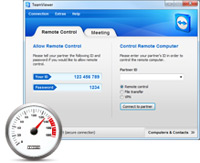
TeamViewer is an excellent screen-sharing and file-transfer app that can be used to facilitate business collaborations, remotely access a second computer, or help distraught relatives diagnose and cure computer problems. Along with being free for noncorporate use, it gives users precisely the tools they need to share screens securely, send files with a minimum of hassle, control access rights, and even flip which user has control.
The options available while you're in control work smoothly. You can maximize the pane that the other computer's screen is visible in, as well as utilize several smart options from a drop-down toolbar in the center of the window. A big X lets you close the connection, while the Actions button lets you switch who's in control, disable remote input, and reboot remotely. The View menu hides options to adjust the screen resolution, the optimization toward speed or quality, and control multiple-monitor displays. New features that work just as effortlessly as the old ones include VoIP audio and video conferencing, and integrated teleconferencing. These features push TeamViewer a notch above the rest because they will work without requiring firewall reconfiguration.
When you log in, you're given an access code and a password. Sharing those allows your computer to be controlled by the level you set it to: remote support, presentation, file transfer, or VPN. The TeamViewer servers remember which computers you've connected to, so reconnecting to previously shared computers happens faster. TeamViewer also has a Web-based version, for remote connecting to home from public computer. Even the installation process is impressive. Users can toggle admin rights, can opt out of running at startup, and can opt into installing the TeamViewer VPN driver for more secure screen sharing. TeamViewer makes screen-sharing and file-sharing as fluid and unobtrusive as it should be, and is a must-have for the home or remote office user.


Rapidgator.net